Fixed position control
The various climate controls are set to a fixed position (0 or off) by default. You can manage the fixed position settings on the fixed position screen.
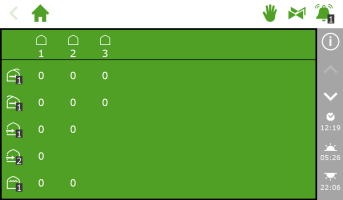
Figure 112: Fixed position screen
To open the fixed position screen, tap the Fixed Position icon ' ‘ on the top bar. The fixed position screen displays all the associated climate controls. You can configure the fixed position settings independently for each zone. You can choose from:
-
A fixed position
This means you set a fixed position or operating mode.
-
Control mode
Control mode means that the settings from stage control will be used.
Configuring fixed position settings
To configure the fixed position settings, proceed as follows:
- Tap a value. A pop-up window appears.
- Choose one of these:
- Enter a fixed position (for example, 40%) or a fixed operating mode (for example, on).
- Tap the Control Mode icon ‘
 '.
'.
- Tap confirm ‘
 '.
'.
You have configured the fixed position settings.
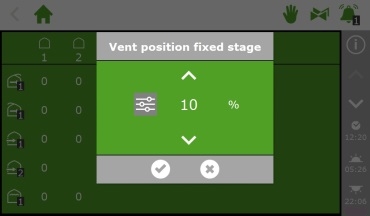
Figure 113: Configuring fixed position settings
Fixed positions are not adjusted for the climate conditions inside your greenhouse and they apply for the entire day. Fixed position control enables a desired position or mode to be achieved quickly without altering any of the other program settings.